
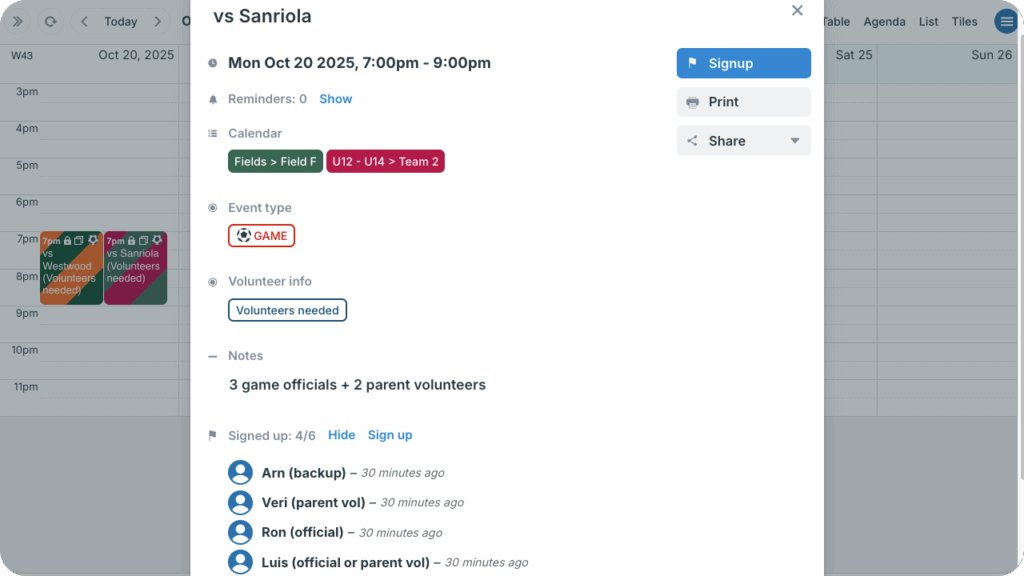
What are event signups?
Event signups allow people to sign up for an event with their name and email address. The event organizer(s) can easily see (and export) a list of people who have signed up for an event. Signups are fully functional on the Teamup app as well as in a browser.
▶️ Configure Default Settings for Event Signups
Enable event signups

The calendar administrator can enable signups for all events and set a default deadline, maximum number, and viewing permission.
- Browser: Manage event signups
- Teamup app: Manage event signups
Users with an appropriate permission level can adjust event signups on individual events unless the calendar administrator deactivates event signups completely.
Use event signups
When you share an event or an event page with signups enabled, viewers will see a Signup button.
To signup, they click the button and enter their name and email to sign up. When a Teamup user signs up for an event, they will receive an email confirmation.
Once the signup max is reached or the signup deadline has passed, the Signup button will no longer be shown.
- Signup limits by plan: Calendars on the free plan can have up to 200 signups per event; calendars on paid plans can have up to 1,000 signups per event.
Learn more about event signups
ℹ️ Event Signups on The Teamup App
ℹ️ Email Confirmation for Event Signups