
Teamup is currently available in multiple languages, including Simplified and Traditional Chinese. Other language translations are in progress. All calendar users can change the language when using a Teamup calendar. Calendar administrators can set the default language for the calendar.
Change the language
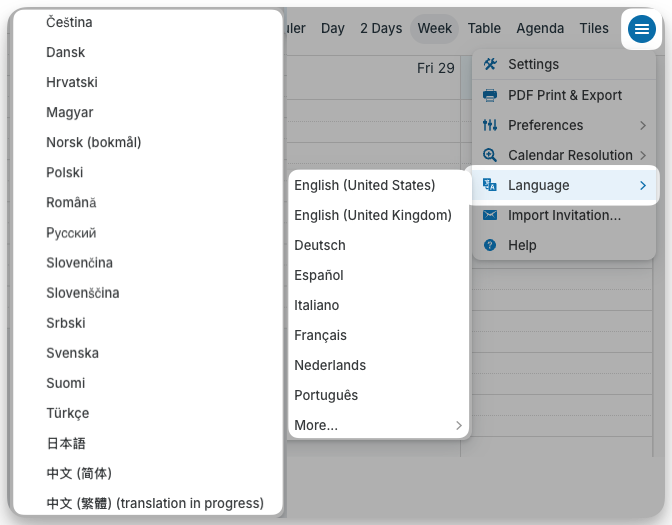
Browser
- Click the blue menu button in the top right.
- Select Language.
- Click More to see the full list of available languages.
- Click on the language you wish to use.
Mobile browser
If using Teamup on a mobile browser, follow the steps above for a browser.
Language parameter
To change the language for your current browser session only, append the language parameter to the calendar URL as demonstrated here.
Teamup app
The language of the Teamup app is set by the language in your device’s settings. To change the language used in the Teamup app, change the language selected in your device settings.
If your device language is not among Teamup’s supported languages, English will be used in the app.
ℹ️ Change the Language in Teamup on a Mobile Device
Set the default language
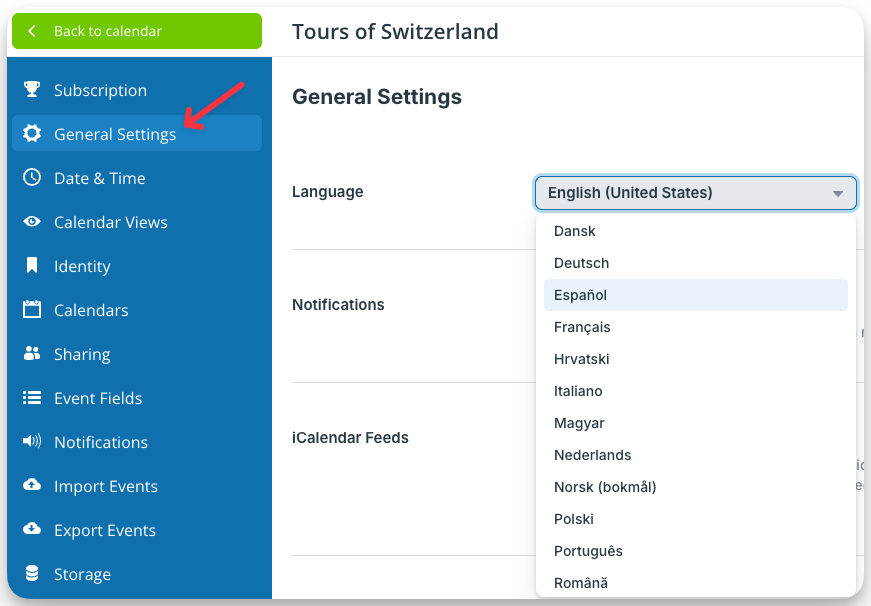
Calendar administrators can set and change the default language of a Teamup Calendar.
- Open Teamup in a browser.
- Go to Settings > General Settings.
- Select the language from the drop-down list.
Note that the language setting applies to the language shown on the Teamup interface such as headers, menu options, buttons, etc.
You can add information to any event in any language in the event editor.